Showing posts with label Comparison. Show all posts

Friday, October 2, 2015

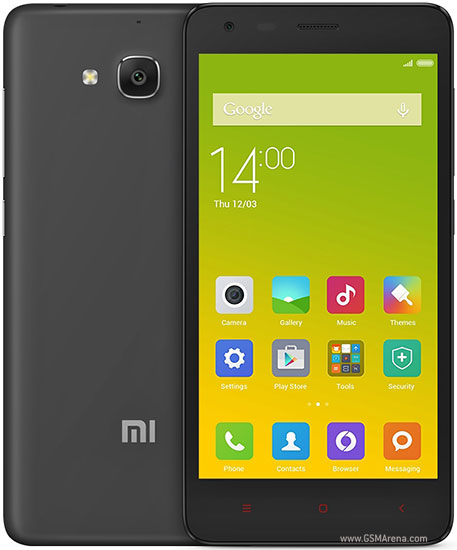
Lenovo A6000 plus v/s Redmi 2 Prime

As the mobile price war begin, we have two giants changing the game in 3rd quarter of 2015. Xiaomi's Redmi 2 Prime and Lenovo's A6000 plus.

A6000 Plus
Redmi 2 Prime

Xiaomi is obvious pioneer in the game of the low cost no compromise smart phones, but even though with it success, this company does not try to stands out and still has a marketing image of iPhone (iOS) copy, where as the Lenovo has earned its name in the laptop market and started to make waves at mobile market. 

There are lots of phone which could have been regarded as low cost and high quality but the features these two phones offer features at this price which really stands out. 

Because these two phone are almost identical underneath it is really hard to choose between them. 

Both Have identical chip set 

Chipset: Qualcomm MSM8916 Snapdragon 410
CPU: Quad-core 1.2 GHz Cortex-A53 (This is 64bit CPU offering from arm)
GPU: Adreno 306 (not a great one, but many games like temple run and clash of clan run fine)
Card Slot: microSD, up to 32 GB (64 gb Tested in Redmi 2 Prime)
Internal Memory: 16 GB (This should cover the App and cache load on your phone nicely) 
RAM: 2 GB RAM (iPhone 6 has 1GB RAM, these one got 2GB)

Almost Identical Camera  

8 mega pixel primary and 2 mega pixel Secondary camera is found in both, but because lenovo process the image on the fly, you will see some lag in the viewfinder, while the Redmi Camera works with a charm, both camera take good pictures and videos, which in good lit condition are very sharp, but still I feel the color and contrast of Redmi 2 is better. 

Screen

Lenovo A6000 plus: 5 inch@294ppi
Redmi 2 Prime: 4.7 inch@312ppi  

Though the 5" screen size of A6000 Plus is somewhat current trend these days, but which 4.7" screen the Redmi 2 just feel right in your hand, however dispite of big screen size the A6000 plus do feel little lighter in your hand. 

Both phones are dual Sim with 4G capability. The battery backup is almost Identical 2200mah for Redmi and 2300mah A6000 Plus.

Lenovo A6000 Plus lacks a serious geeky feature called Gyroscope, for a normal user it really does not matter much, but for Geeky users it means the phone can't know its orientation in space and features like Google Sky Map and Google Cardboard. Surprisingly even with a low cost tag Redmi Includes this.

Which one should you buy ? 

Even though both have same chipset the Redmi 2 Prime do have a little bit of upper hand with better camera, better screen resolution and Gyroscope and if you are a casual android user you should definitely go with Redmi 2 Prime. MIUI look like cheap rip off of iOS, it might be a bad taste for few people but that a personal preference.

However if you want to use the phone for official use, the latest MIUI 6 (Redmi2 Prime Launcher) have a serious flaw, it does not have option to encrypt the phone under security settings (or anywhere), which means that if your office required your phone to be encrypted, you can't use it. Where as Lenovo A6000 Plus, do includes encryption as standard feature. 


Friday, August 29, 2014

Lightroom Vs Picasa

This is a very confusion topic for any amateur photographer who just starting to explore what is out here which can help him/her getting full potential of their photography.

Yes, camera is a first tool you should get, but that is only one part of the story, you cannot forever organise your picture in folders, or take a perfect shot every time. You need something better, and  Google's Picasa do the excellent jobs, it is the best photo organiser on Windows platform you can get, and I don't think that things can get better than that without adding added complexity.


Here are some bullet point to summarise Picasa: 
  1. Excellent photo organiser, No complex photo structure is needed, just tell picasa to folder to look into and it will automatically organise pictures by date.
  2. Give quick search on pictures, Indexing is superfine and you can fly through pictures in without any lags.
  3. Facetag features is awesome, you can just find a person pictures.
  4. Quick editing tools are easy to use, and more than you will ever need if you use a point and shoot or phone camera. 
  5. Supports almost any format (including raw and confuse people, we will come back to that)
But in the end of the day it is a photo organiser, not a editing tool, it gives you tools to make your life easy, and tools Picasa give are very good, but not the best in the market, you can always use gimp or photoshop, but using these tools can be cumbersome, each photo on these tools take lot of effort for simple touch up also, so we need something in between Photoshop and Picasa, Hence enter Lightroom.

Before going any further with lightroom, I would I like to point out what Lightroom is not or should not used for.
  1. Lightroom is not a photo organiser, sure you can use it that way, but it will make your life painful, when you want to go through some old memories. 
  2. Lightroom is not a photo organiser, I can not press this point more, but repeat again, Lightroom is not a photo organiser, sure it give you a library option, but that it to move through pictures which you are currently editing, not keep your library full of 100000 jpegs of birthday pictures and random holiday pictures. 
  3. Lightroom is not photoshop (or even close) : Lightroom give you full hand with exposure, contrast, colors, saturation, sharpness, you can have fine control on every feature, but you can not change what is in the pictures (except some healing or cropping), its usages is somewhere between Photoshop (or gimp) and Picasa.   
Now when we have established how not to use Lightroom, lets go ahead, when you already have a great, and not to forget FREE! tool like Picasa, which also support RAW!, why you should go for Lightroom (which don't even organise you photo well). This question kept me perplexed for very long time until I muscled through the initial barrier saw some internet videos and start using damm thing! Lightroom has a pretty good learning graph and even to use it in simple way you should go though some initial online training first, you will find tons or videos on Adobe site and youtube.

Now the big question? RAW is the way to click pictures! atleast everyone on web is saying so!, yes Indeed, If you have a camera which supports raw, and you really wants to have total control over how your pictures comes out. Picasa which is developed  by Tech God Google and also supports Raw, why not use it instead of Lightroom? There is a problem as we earlier mentioned, Picasa is highly limited when it come to develop you pictures.

Below is the screenshot of the Picasa exposure control and it only do
  • Fill Light
  • Highlights
  • Shadows 
  • and Neutral Colour
Thats it! Sure they are sufficient for point and shoots and most of the Mobile and Nikon Coolpix pictures you take, but it come to even amateur level this limited controls will limit you considerably. 


We have talked little about Picasa controls and here is the screenshot of Lightroom exposure control

Only controls fills the screen horizontal screen, you can manage from contrast to tones curves. In one picture I have changed the yellow leaves to green make the picture more vibrant. 

You can see how a single image can be changed to HDR using Lightroom, because it gives you control on full pictures and on small areas of the images, like shown in this Video on Youtube. 


There are few more pros,
  1. Unlike Picasa limited pictures effects Lightroom has almost unlimited presets, which can be fine tune to fit your picture. 
  2. It integrates well with Photoshot or Gimp (no partiality it does with both)
  3. No other close competitive platform on Windows, (on Mac you get "Aperture" on Linux there is "Darktable") but on Windows, Lightroom is the King, there is Nikon Capture NX, but it is more expensive and very specific to Nikon (though people says it handle Nikon Tiff Files better)
  4. It does not change your picture permanently, but create a parallel files which each time process you picture view when you load it (hence Lightroom needs lots of processing powers, you old P4 will or Intel atom will die using it).
This comparison graph can go longer and longer and I can show what Picasa can do and Lightoom can't do and vice versa, But in a nutshell.

Picasa : Organise and share pictures well (very well).

Lightroom : Edit Pictures well give you good control on Exposure, Give no more features than photoshop, but (and it is a big but) it provide the most used tools in a way that you can edit 100 of pictures much faster than photoshop.


I hope, I helped you to know the difference between two top notch picture software and let you make a decision if it is time to move on to Lightroom.

Let me know if you wants to know more in comments.


Official Google music desktop app

This Article does not make any sense now as google discontinued the Google music app and there is an official youtube music web app Google ...